v0.2 — Windows 10 / 11 · MIT License

Your workstation deserves better than Task Manager.

dofek is a system monitor built for developers running AI workloads — available as a TUI and a native desktop app. VRAM per process. Inference detection. Candlestick CPU charts.

TUI + Desktop·no runtime dependencies·built with Rust
D:\Development\dofek\target\release\dofek.exe
CPU10.2%
GPU22.6%
VRAM7056MB
MEM22.5%
ollama — inferring
CANDLE CPU 10.2% 60s
PROCESSES — sort: MEM
CPU
GPU
Util
0%
VRAM
7GB
MEM
Used
22%
NET
0 B/s
0 B/s
dofek TUI in action

Most system monitors were designed before LLMs ran locally. They treat GPU as an afterthought and VRAM as a footnote. dofek is built for what your workstation actually does today.

Variance, not just averages

Candlestick charts show CPU min/max/mean per time slot. Bursty spikes are visible. Steady load looks different from jittery load. No other monitor shows you this.

VRAM per process

The column Windows Task Manager doesn't have. See exactly which process is consuming your GPU memory — ollama, python, your game, your renderer — at a glance.

AI workload detection

Automatic inference/loading/idle classification for AI processes. Know whether ollama is actively generating, loading a model, or sitting idle — without checking logs.

See variance,
not just averages.

Every other monitor draws a smooth line and calls it a CPU chart. dofek draws candlesticks — the same visual language traders use to read market volatility. Each bar shows the full min/max range and interquartile spread for that time window.

  • Wick spans the full min/max range per 500ms slot
  • Body shows the P25–P75 interquartile spread
  • Thick tick marks the mean value
  • Threshold lines at 80% (warn) and 90% (critical)
  • Switchable to area chart for GPU, MEM, and NET
CANDLE 10.2% AMD Ryzen 7 7800X3D

Your processes,
categorized.

Tag processes as AI, DEV, or WATCH. Filter the table to just the ones you care about. dofek auto-detects known AI runtimes and dev tools — and lets you extend the list in your config.

  • ● AI — ollama, python, LM Studio, any VRAM consumer
  • ■ DEV — VS Code, browsers, terminals, build tools
  • ★ WATCH — your own pipeline processes, user-defined
  • Extend categories via dofek.toml config
  • Filter tabs narrow the table without losing sort order
PROCESSES
NAMECPU%MEMVRAMSTATUS
PLUGINS coming soon
Plugin dock — planned feature.
→ Extend dofek via stdout JSON protocol

Multi-GPU,
fully resolved.

Aggregate stats across all your GPUs in the ALL view, then drill into any individual card. The combined VRAM bar shows each device's share side-by-side. The main chart overlays both GPU utilization curves simultaneously.

  • Aggregated Util / VRAM / Temp / Power across all GPUs
  • Per-GPU tabs for individual device breakdown
  • Dual-color VRAM bar shows per-GPU contribution
  • Max temperature and summed power across all devices
  • GPU overlay on the main chart shows both curves
GPU

Prefer a window?
We built that too.

The desktop edition is a Tauri-powered native app with the same real-time data engine and trading-terminal aesthetic. Mouse interaction, resizable panes, and a windowed layout that sits alongside your other tools.

  • Resizable chart and watchlist panes via drag handle
  • Candlestick and horizon chart modes with tab switching
  • Clickable column sorting in the process table
  • Full keyboard shortcut support (same bindings as TUI)
  • Lightweight — Tauri, not Electron. Small binary, low overhead
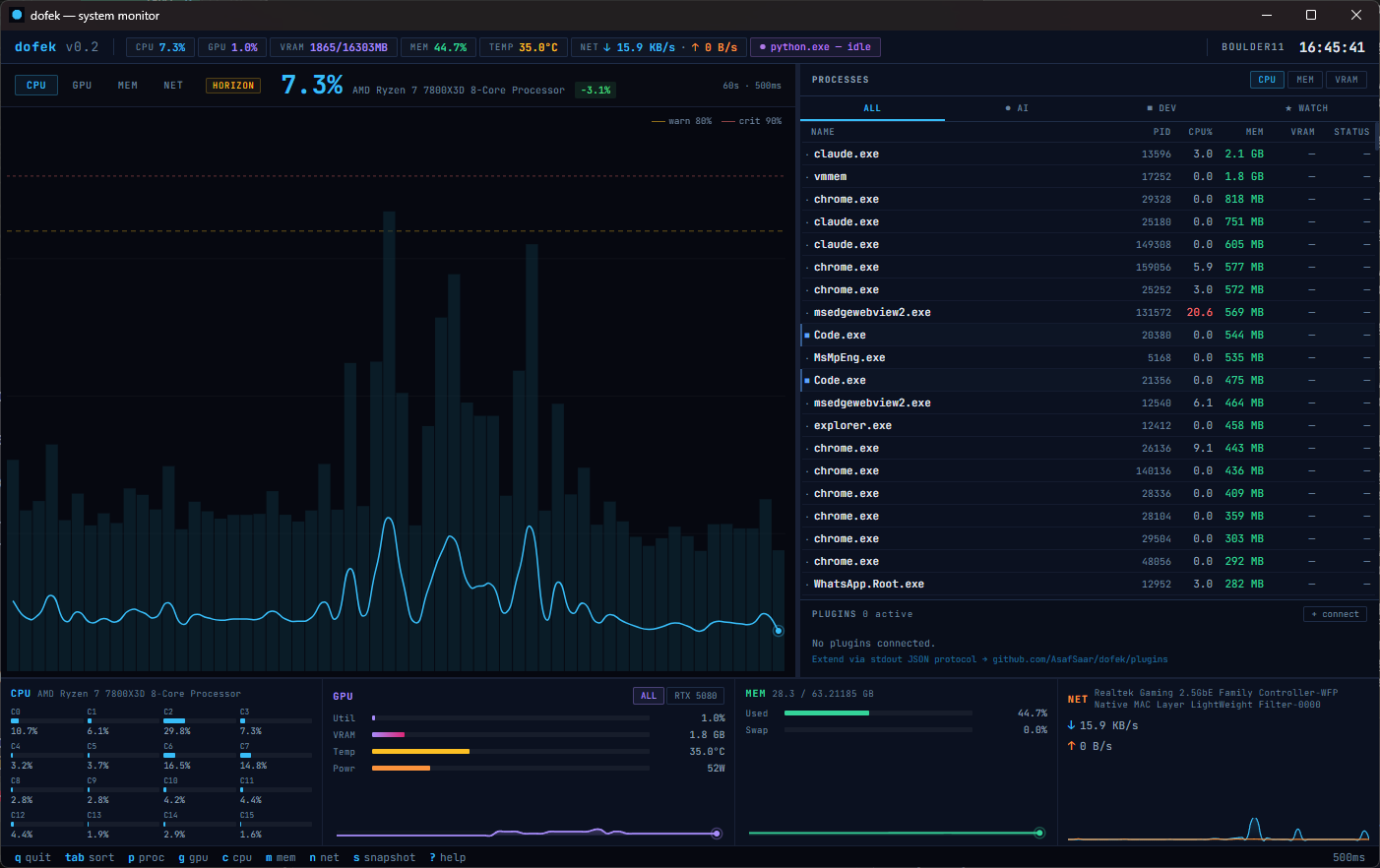
dofek — system monitor
dofek desktop GUI

The viral engine.
Build what dofek doesn't ship.

The planned plugin system will let any process that writes JSON to stdout become a dofek plugin. One config line, and your plugin gets a live widget in the dock. The protocol is intentionally minimal — here's what it will look like.

// dofek-ollama — example plugin output (stdout, 500ms interval) { "plugin": "dofek-ollama", "version": "0.1.0", "label": "llama3.1:8b", "status": "inferring", "metrics": { "tokens_per_sec": 3.2, "context_used_pct": 82, "queue_depth": 1 } }
dofek-ollama official · v0.1

Token/s, context usage, active model, queue depth. Live inference metrics directly in the dock.

dofek-docker official · coming

Container CPU/MEM per service, health status, restart count. Your compose stack at a glance.

dofek-lmstudio community

LM Studio model status, GPU layer count, generation speed. For the GUI-local-AI crowd.

build your own any language

Rust, Python, Node, Go — any process that can write JSON to stdout can be a plugin. See the protocol docs on GitHub.

QUICK START

Up in three steps.

01 — DOWNLOAD OR BUILD
Get the binary
Grab the TUI or desktop app from GitHub Releases, or build either from source with the Rust stable toolchain and VS Build Tools (C++ workload).
git clone github.com/AsafSaar/dofek
cd dofek
cargo build --release # TUI
cd gui && cargo tauri build # Desktop
02 — RUN
Launch dofek
Run the TUI from any terminal, or launch the desktop app. NVIDIA GPU metrics work automatically via NVML — no extra setup needed.
# TUI
dofek
# Desktop app
dofek-gui
03 — OPTIONAL
LibreHardwareMonitor
For non-NVIDIA GPUs or extra CPU temperature/power sensors, run LHM as admin with the web server on port 8085. dofek will auto-detect it as a fallback.
View on GitHub →
THE DEVELOPER
AS
Asaf Saar
DEVELOPER · PRODUCT BUILDER
AI TOOLING

Asaf spends most of his time at the intersection of systems, AI tooling, and developer experience. When local LLMs became serious — models loading into VRAM, inference running in the background, GPU memory becoming a first-class concern — he found himself staring at Task Manager and coming up empty. The tool for this moment simply didn't exist.

dofek is the result. Built in Rust because performance isn't optional for a monitor, designed around trading terminal principles because developers making real-time decisions deserve the same visual language as traders making real-time ones. Asaf believes the best developer tools are opinionated, visually sharp, and built by people who were frustrated enough to stop waiting for someone else to do it.